for Internet Explorer users....
download the script from box at vac home page www.vacdigital.blogspot.com
Open the file and add the info in the file to registry.
Now open ur Internet Explorer and goto the desired movie page.
Click on the service provider logo (Google,Youtube,Dailymotion etc.)
Start playing the video there. Once it starts buffering right click anywhere in the window and select download option.
Now a popup will comw which in 10 to 15 secs will show download option.
Select it and save the video on ur computer.
Now rename the saved file with extension .flv....
If u chose to u can also convert the file into other formats using softwares like TVC,WinAVI etc...
Njoy ppl.........
vac.
Friday, June 1, 2007

Saturday, May 5, 2007
Speed up IE start up
This tweak makes internet exploer start without laoding any webpages....Even if u have selected a blank page, it takes time to laod the about:blank page....So inorder to satrt IE wiithout anything........
1. Right-click on any shortcut you have to IE
[You should create a shortcut out of your desktop IE icon, and delete the original
icon]
2. Click Properties
3. Add " -nohome" [with a space before the dash] after the endquotes in the Target field.
4. Click OK
There ur done......
nyjoy faster xperience...
jhon.
1. Right-click on any shortcut you have to IE
[You should create a shortcut out of your desktop IE icon, and delete the original
icon]
2. Click Properties
3. Add " -nohome" [with a space before the dash] after the endquotes in the Target field.
4. Click OK
There ur done......
nyjoy faster xperience...
jhon.
Finding out the IP of an Email Sender....

In gmail..click the down arrow in the reply button on top right of the mesage..
now select show original
u'll get a window in which search for received frm
n bingo!!! u got the IP....
now select show original
u'll get a window in which search for received frm
n bingo!!! u got the IP....
luv..
john.
john.
(Click on the image on left to view more clearly....)
Make XP Boot faster....
Stopping Unneeded Startup Services.
Along with the core operating system and programs that Windows XP runs when it
starts, there is also a host of services involved. Many of these services are necessary
for Windows XP to operate correctly. However, many of them are for features in
Windows XP that you may not use at all. You can peruse the services and disable any
service that you do not want to run. The fewer services that run, the more quickly
Windows XP will boot.
To reduce the number of services that start on bootup, you can access two different
areas of Windows XP.
o The first is the System Configuration Utility. You can do that by entering the
command “msconfig” in the run menu.
Start Run “msconfig” (without quotes) Hit Enter
The Services tab shows you the services that start when the computer
boots. You can stop a service from starting by simply clearing the check box
next to the service and clicking OK.
o However, before you do so, there is another way to disable services that you
may prefer because the interface gives you more information about the service
in question.
Open Control Panel Administrative Tools Services or
Start Run “services.msc” Hit Enter
Take a quick look at common services you may want to live without:
Automatic Updates: This service enables Windows XP to check the Web
automatically for updates. If you don't want to use Automatic Updates, you can
disable the service.
Computer Browser: If your computer is not on a network, you don't need this service.
If you are on a network, leave it alone.
DHCP Client: If you are not on a network, you do not need this service. If you are on
a small workgroup, you can still increase boot time by configuring manual IP.
DNS Client: If you are not on a network, you do not need this service.
Error Reporting and Event Log: You don't have to use these services but they can be
very helpful, so I would leave them configured as automatic.
Fax: If you don't use your computer for fax services, you can disable this one.
Help and Support: Disable if you never use the Windows XP Help and Support
Center.
IMAPI CD-Burning COM: This service enables you to burn CDs on your computer.
If you never burn CDs, you can disable the service without any second thoughts.
Indexing Service: Your computer keeps an index of all the files. But if you rarely
search for files, the service is just a resource hog. You can stop it
Windows Firewall/Internet Connection Sharing: If you do not use these features, plz
disable.
Infrared Monitor: If you do not use infrared devices, you can disable this service.
Messenger: This service sends alert messages on a local area network (it is not the
same as Windows Messenger). If you are not on a network, you can disable this
service.
Print Spooler: If you do not do any printing from the computer, you can disable this
service. If you print, make sure you leave it as automatic.
Remote Registry: This service allows remote users to modify the Registry on your
computer. If you are not on a network, you can disable this service.
System Restore Service: This service allows you to use System Restore. If you have
turned off System Restore anyway, you do not need to turn off the service.
Themes: If you do not use themes, you can disable this service.
Windows Image Acquisition: If you do not use scanners or digital cameras, you can
disable.
Wireless Zero Configuration: If do not use wireless networking devices, you can
disable it also.
get ready to njoy the faster xperience......
john.
Along with the core operating system and programs that Windows XP runs when it
starts, there is also a host of services involved. Many of these services are necessary
for Windows XP to operate correctly. However, many of them are for features in
Windows XP that you may not use at all. You can peruse the services and disable any
service that you do not want to run. The fewer services that run, the more quickly
Windows XP will boot.
To reduce the number of services that start on bootup, you can access two different
areas of Windows XP.
o The first is the System Configuration Utility. You can do that by entering the
command “msconfig” in the run menu.
Start Run “msconfig” (without quotes) Hit Enter
The Services tab shows you the services that start when the computer
boots. You can stop a service from starting by simply clearing the check box
next to the service and clicking OK.
o However, before you do so, there is another way to disable services that you
may prefer because the interface gives you more information about the service
in question.
Open Control Panel Administrative Tools Services or
Start Run “services.msc” Hit Enter
Take a quick look at common services you may want to live without:
Automatic Updates: This service enables Windows XP to check the Web
automatically for updates. If you don't want to use Automatic Updates, you can
disable the service.
Computer Browser: If your computer is not on a network, you don't need this service.
If you are on a network, leave it alone.
DHCP Client: If you are not on a network, you do not need this service. If you are on
a small workgroup, you can still increase boot time by configuring manual IP.
DNS Client: If you are not on a network, you do not need this service.
Error Reporting and Event Log: You don't have to use these services but they can be
very helpful, so I would leave them configured as automatic.
Fax: If you don't use your computer for fax services, you can disable this one.
Help and Support: Disable if you never use the Windows XP Help and Support
Center.
IMAPI CD-Burning COM: This service enables you to burn CDs on your computer.
If you never burn CDs, you can disable the service without any second thoughts.
Indexing Service: Your computer keeps an index of all the files. But if you rarely
search for files, the service is just a resource hog. You can stop it
Windows Firewall/Internet Connection Sharing: If you do not use these features, plz
disable.
Infrared Monitor: If you do not use infrared devices, you can disable this service.
Messenger: This service sends alert messages on a local area network (it is not the
same as Windows Messenger). If you are not on a network, you can disable this
service.
Print Spooler: If you do not do any printing from the computer, you can disable this
service. If you print, make sure you leave it as automatic.
Remote Registry: This service allows remote users to modify the Registry on your
computer. If you are not on a network, you can disable this service.
System Restore Service: This service allows you to use System Restore. If you have
turned off System Restore anyway, you do not need to turn off the service.
Themes: If you do not use themes, you can disable this service.
Windows Image Acquisition: If you do not use scanners or digital cameras, you can
disable.
Wireless Zero Configuration: If do not use wireless networking devices, you can
disable it also.
get ready to njoy the faster xperience......
john.
Tuesday, March 27, 2007
Every time give a new Email Id to Your Friends
Only for Gmail
Now Friends the very first Trick Of Gmail that I Love the most. So, it goes like this, say i have a email id vacdigital@gmail.com
If my Friends wants to send a mail then they will send it at this email address. Now, Let there be two friends of mine, there may be many. Rahul,Sreehari
If i want to give my friends a unique email id like.......
For Rahul it could be "vacdigital+Rahul@gmail.com"
For Sreehari it could be "vacdigital+Sreehari@gmail.com"
So, its simple you could add anything after the initial mail by adding a "+" sign. As all these Email Addresses vacdigital+Rahul@gmail.com, vacdigital+Sreehari@gmail.com are the same as vacdigital@gmail.com
If you have a girlfriend/Boyfriend then impress her/him that how much you love
her/him by showing her/his name in ur mail id.
Note: This only works when you are sending mails, Not for logging into your
account.
Njoy.....
john.
Sunday, March 18, 2007
Nokia E90 Communicator
Nokia E90 to be launched and here is a screen shot of the future of ommunication. The Nokia E90 is supposed to have quad-band GSM and HSDPA support, WiFi, a wide internal display of 800x352, a hefty QVGA external display, both of which support 16 million colors and a 3.2 megapixel camera. 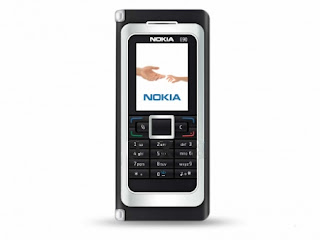
isn't it sleek....
john.
Agloco: Get Paid to Surf
When I first heard of Agloco (aff), I considered it as a flop pyramid scam, but I was wrong. Agloco turned out to be immensely popular among everybody. I’m not in a position to comment over Agloco because their viewbar isn’t available yet, but I’m a member of Agloco and I’ll try to invite my friends into it (hoping that I’ll generate some revenues). Sadly spammers have been trying to take Agloco to the masses by spamming innocent members of forums, discussion groups and other social networks.
It’s OK to invite your friends and family, It’s OK to use your blog to introduce Agloco to your readers, but going off the track and spamming random members of social networks (like MyBlogLog and Orkut) is surely wrong. Spammers have created new profiles by the name ‘agloco’, just for the sake of spamming. If you want to introduce someone to Agloco, why hide?
I don’t think Agloco is a scam in itself. It will be interesting to see how much revenue we can generate by actually browsing with their viewbar installed. We being small timers, it might be hard for us to generate revenue out of Agloco.
Have you been a victim to such spam? Share your experience.
It’s OK to invite your friends and family, It’s OK to use your blog to introduce Agloco to your readers, but going off the track and spamming random members of social networks (like MyBlogLog and Orkut) is surely wrong. Spammers have created new profiles by the name ‘agloco’, just for the sake of spamming. If you want to introduce someone to Agloco, why hide?
I don’t think Agloco is a scam in itself. It will be interesting to see how much revenue we can generate by actually browsing with their viewbar installed. We being small timers, it might be hard for us to generate revenue out of Agloco.
Have you been a victim to such spam? Share your experience.
HD the way to go
If u think 108 inch HDTV is big.....then think again. Technovision has come out with a colossal 205 inch Luxion LCD HDTV.
Technovision is an Italian company that specializes in outdoor displays, which is probably why no one really heard about them till now. The ginormous HDTV, however is made for internal display.
I doubt this TV (or brand) will be entering our shores anytime soon. Besides, looking at the size of our houses, you'll probably have to move out a family member to fit this momma in.
so start clearing ur walls.....
john.
Saturday, March 17, 2007
Google Talk: Tips and Tricks
Google Talk has been my primary instant messenger for quite a while now. Here’s a short list of productive Google Talk shortcuts which frequently come to use:
1. Google Talk hides itself in your tray or taskbar, use Windows + Esc to open it.
2. While talking to two or more buddies simultaneously, use Ctrl + Tab to switch chat windows instantly .
3. Use the F11 key to start voice call with your buddy.
4. Use the F12 key to end the voice call.
Easter Egg: You can send a blank message to your buddy without an text. Simple hold the Alt key and press “0173”, followed by the return key [Enter]. You’ll just see a bubble conversation, nothing else!
Recording Voice Calls: In order to record voice call, we use Solicall. Basically, it’s a noise reduction application for online conversation, but it acts as a middle man in taping voice calls. It not only works with Google Talk, but it also works with other IMs like Yahoo, MSN and Skype. Refer this page for more detail on configuring Solicall for Google Talk.
happy talking.....
john.
1. Google Talk hides itself in your tray or taskbar, use Windows + Esc to open it.
2. While talking to two or more buddies simultaneously, use Ctrl + Tab to switch chat windows instantly .
3. Use the F11 key to start voice call with your buddy.
4. Use the F12 key to end the voice call.
Easter Egg: You can send a blank message to your buddy without an text. Simple hold the Alt key and press “0173”, followed by the return key [Enter]. You’ll just see a bubble conversation, nothing else!
Recording Voice Calls: In order to record voice call, we use Solicall. Basically, it’s a noise reduction application for online conversation, but it acts as a middle man in taping voice calls. It not only works with Google Talk, but it also works with other IMs like Yahoo, MSN and Skype. Refer this page for more detail on configuring Solicall for Google Talk.
happy talking.....
john.
Apple's iPhone
Yay!, After years of anticipation and rumors, Apple finally made the big announcement on iPhone at Macworld. Here’s a brief list of features:
- 11.6 mm (thickness)
- 3.5 in. (width)
- Runs Mac OS X (access to Safari Web browser)
- Touchscreen display with multi-touch support
- 2 Megapixel camera
- 8 GB storage
- Bluetooth with EDR and also WiFi
- Quadband GSM radio with EDGE
- EDGE or WiFi, the phone switches to WiFi when detected
- Google Maps: Satellite directions, traffic monitoring, and normal
maps. - Random access voicemail
- Widgets: Weather and stocks
- Photo album lets you scroll through images with your finger and you
pan zoom in/out by “squeezing” or “pinching” the screen with two fingers. - The orientation of the screen (landscape or portrait) will
automatically rotate based upon the orientation of the device itself.
According to Apple, iPhone’s battery holds 5 hours of Video or Talk,
16 hours or music. iPhone is available in 4GB and 8GB variants and costs $499
and $599 respectively.

Looks like Apple has squeezed everything into iPhone, I was shocked to read that it runs OS X and has a iChat like SMS application with onscreen keyboard. I was expecting a 3.2 Megapixel camera on iPhone, but 2 Megapixel seems to be a standard thesedays. iPhone users would probable carry an iPod, because 8GB is quite low when compare to high end iPods.
Now the bad news is that iPhone won’t start shipping until June 2007. European stores will get iPhone somewhere around fourth quarter 2007, It will reach Asia by 2008. Damn!, I’ll have to wait for a year.
keep talking....john.
Google Phone
Mobileburn forum revealed some details over Google Phone. Google has apparently tied up with Samsung to design Google Phone. This information was leaked by someone participating in the paid survey program by Google; he has uploaded a screenshot of the survey page at Flickr. The screenshot looks somewhat valid, but still the story might not be trustworthy. However, the spec seems to be quite reasonable with 3G, Wi-Fi, 2 megapixel camera and a QUERTY Keyboard. 
The phone looks like a typical Samsung Design. This may or may-not be the final design (do you remember? Same happened before iPhone was released). If Google comes up with something like this, Apple will undoubtedly get a market rival. I bet the guy who leaked the screenshot will be fired from the paid survey program.
Gooooogle keeps getting better....
john.
The phone looks like a typical Samsung Design. This may or may-not be the final design (do you remember? Same happened before iPhone was released). If Google comes up with something like this, Apple will undoubtedly get a market rival. I bet the guy who leaked the screenshot will be fired from the paid survey program.
Gooooogle keeps getting better....
john.
Cellphone of the Future: Nokia 888
Nokia 888 claims to be the cellphone of the future. The device is so compact and ultra portable that you could bend it, mould it to any shape, you can even strap it like a wrist watch.


This new concept was designed for Nokia Benelux Design Awards by Tamer Nakisci. It runs on Liquid Batteries, Flexible Touch Screen and Speech Recognition technology. It can sense your touch and teach itself (artificial Intelligence). Best of all, it lets you send your form (shape) to other 888 users (Mould it in a shape of the heart and send to your girl friend 
This phone has only appeared on the drawing board till now, so it might take few more years before its available to consumers. It actually reminds me the famous James Bond Movie, where Agent 007 carries all such Gizmo Gadgets.
hav fun.....
john.
Photoshop goes Online
 Photoshop is undoubtedly the best image editing tool for both Windows and Mac, but it comes with a heavy price tag of 649$. If the reports from CNet are correct, things might change within the next six months. Adobe is planning to launch a free online, ad-supported version of the popular Adobe Photoshop. This hosted version of Photoshop works using the recently developed Adobe Flex platform (the same thing which powers Photobucket’s online Video editor).
Virtually everything is moving online thesedays. If Adobe doesn’t do this now, somebody else will do it. It’s just the matter of time. As an example, we’ve seen Google do this to Microsoft Office. The hosted version of Photoshop isn’t a bad idea at all. Infact, it might encourage users who use the pirated copy of Photoshop to turn towards the web based version.
Would you prefer using an ad-supported, hosted version of Photoshop or pay 649$ and buy it? I’m quite sure that if you run a poll on this question, ad-support hosted version will win with a clear margin.
catch imaging mania....
john.
Wednesday, March 14, 2007
Free Mobile Calls using Fring


You can call anybody on your Skype, Google Talk contact list for free, they
can call you as well. Isn’t it a life saver?
I’ve tried Fring from both the ends, voice quality is fairly good, but the voice gets choppy inside buildings or basements (I guess, that’s quite natural). To get Fring, go to their download page and fill-in some details, you’ll get a text containing the download link. As of now, Fring supports only Nokia handsets including N70, N72, N80, N80i, N90, 6630, 6680, 6681, 6682.
Fring Fring!
john.
Imified – Add More Productivity to IM


No signup procedure involved, you just need to add “Imified” as buddy on your IM and send a message. Now, the bot will reply with the instructions. There are plenty of reasons to use Imified. For instance, you need to post a reminder without using the browser or write a quick blog entry from your mobile. IM bots are not something new, but adding productive functionalities and control web applications through it is a real vantage point.
IM today.......john.
Free Unlimited Music Storage

service which offered unlimited storage space and high quality audio streaming across the web. The whole idea is to “give people access to their own music everywhere — not just a closed device or PC”.
A paid subscription of Oboe is available for $39.95 per year. While the free service offers unlimited storage and high-quality streaming, the premium version support large music file upto 50MB in size and streams music to web-enabled device.

You can synchronize your music library with online Oboe Locker using a free utility called Oboe Sync. Mp3tunes plan to cover their bandwidth bills and other hosting expenses through advertising. RIAA probably can’t sue MP3Tunes because users do all the uploading and they are just storage medium.
make an online collection today...
john.
Microsoft Virtual PC 2007
Microsoft has released Virtual PC 2007 and is available for free download from their website.
Virtual PC is a brilliant piece of software; it allows you to run multiple operating systems at the same time on a single physical machine.
Virtual PC is a brilliant piece of software; it allows you to run multiple operating systems at the same time on a single physical machine.

With Virtual PC, you can test new software and see if it works in a safe environment without interrupting your physical PC. It can seamlessly switch over to other operating system, just like your switch applications. With the new version of Virtual PC 2007, users can drag and drop, copy and paste files between guest and host. Virtual PC 2007 enables you to run any of these
operating systems along with your physical PC:
- Windows 98: 64MB memory and 500MB disk space
- Windows ME: 96MB memory and 2GB disk space
- Windows 2000: 96MB memory and 2GB disk space
- Windows XP Home/Pro: 128MB memory and 2GB disk space
- Windows Vista Enterprise, Business, and Ultimate: 512MB memory and 15GB disk space
Other features include Mouse Integration and Time synchronization between virtual and host PC. Virtual PC 2007 supports both Intel and AMD Hardware and is packed into two versions,
32-bit and 64-bit version. They have put up a small demo of Virtual PC 2007, check it out.
Njoy the Xperience of multi OS.....
john.
Hidden Windows XP Soundtrack
Windows XP has a hidden sound track which plays as background music during Windows XP installation process, but most people can’t hear this music because they have a soundcard that won’t have drivers preinstalled on XP. Here’s a way to uncover it:
Navigate to C:\Windows\system32\oobe\images, go to Tools > Folder Options > View, check Show Hidden Files and Folders options and then uncheck Hide Protected Operating System Files. You will now notice a file called title.wma, that’s the hidden sound track!!

Easier alternative is to search for title.wma, but remember to include hidden files.
hav fun.....
john.
Cooliris Preview: A must have Browser Addon
Cooliris Previews is a must have browser
addon for power surfers. It boosts your efficiency by adding a Cooliris icon near every link, hovering over the link will open the content of underlying page in a new window.

The preview isn’t just a screenshot, you can actually browse the page,
visit links or even watch videos through the preview window, as if it was a tab.
The preview window automatically closes when you move the mouse away. The
preview window also contains some buttons which can share the link with your
friends, open the page in new tab or lock the preview window (so that it doesn’t
close when you move the mouse away).
Cooliris comes extremely handy while searching the web; you can see
the results, before actually visit the page. Initially developed as a Firefox
Extension, Cooliris Previews is now available for Internet Explorer and
Safari as well.
hav fun previewing....
john.
Mega Upload Premium Link Generator
MegaUpload Premium link Generator is a very useful tool for bypassing
speed limit or waiting time. You can download multiply files with full speed
just like Premium user

Just put MegaUpload download links and hit the “Submit
Link to Maker” button
MegaUpload Premium Account Generator
hope u'll catch downloading mania....
John.
Subscribe to:
Posts (Atom)
